It’s (already!) the beginning of February so it’s about time we actually got our act together and replaced our still-pitifully-displaying-December calendar in the kitchen. And this year John actually wanted to DIY one. Isn’t he industrious? His big calendar concept: to pick out a bunch of our favorite “inside joke” quotes and slap them on top of a long skinny white numbered page so we’d get a little private chuckle every time we checked out the date or penciled in an appointment. Cute huh?
He actually said it was going to be a secret V-day present for me but since February 14th is a few weeks off (and we both felt like bigtime slackers every time we looked at the expired oh-nine calendar) he shared his idea so we could do it together on the last weekend of January. And thanks to it already practically being February, we only needed eleven quotes and we were able to quickly whip up a simple little calendar template in Photoshop (we just adjusted the dates and the hues along with the quote to get all of the months churned out in under an hour).
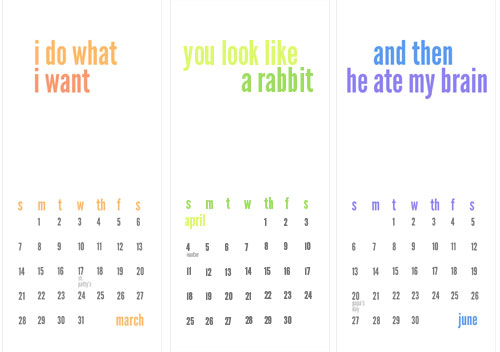
And the good news is that you probably don’t need a fancy program like Photoshop or Illustrator to make one yourself. You might be able to create something sweet and simple in Powerpoint or even Microsoft Word. Oh and the font is called League Gothic and we got it for free from this site that How About Orange suggested. Easy, peasy.
Then we just printed each page out on regular sheets of 8.5 x 11″ cardstock that we had on hand (100 lb weight, which you can grab at Office Max or Staples and run through any regular inkjet printer). We were sure to include thin gray lines so we knew where to cut them to create nice long strips out of the previously-standard-sized page. Burger served as my inspiration as I cut them all out in front of the TV…
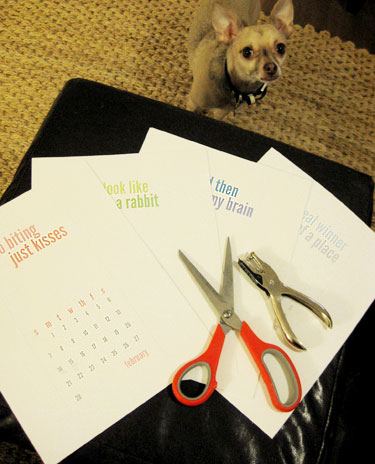
Then we just popped a hole in the top of each of ’em so we could slip them onto the small wire 3M Command hook that we have in the kitchen as our designated calendar hanging device (it’s 100% removable so it won’t damage our side-of-the-fridge built-in if we ever want to move it or take it down).
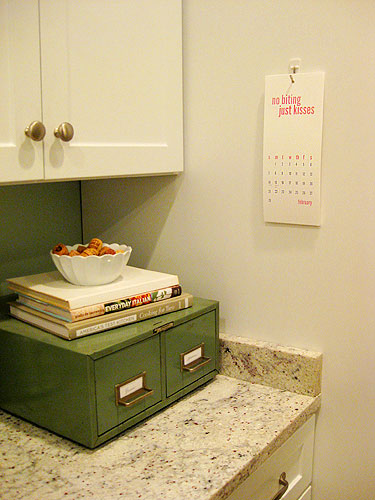
So here’s our 100% free homemade calendar hanging proudly in the kitchen. We love how customized it feels and how much it makes us smile whenever we read each personalized phrase that we thoughtfully chose to represent each month. For example, we often tell Burger “no biting, just kisses” when he does those little no-pressure puppy nibbles that wouldn’t hurt a fly. As soon as we utter the phrase we get hand licks instead of fake bites. So cute. And of course we designated that as the February quote since V-day is all about kisses, and I guess it’s sort of anti-biting (since that’s hardly the sweet thing to do to those you love).
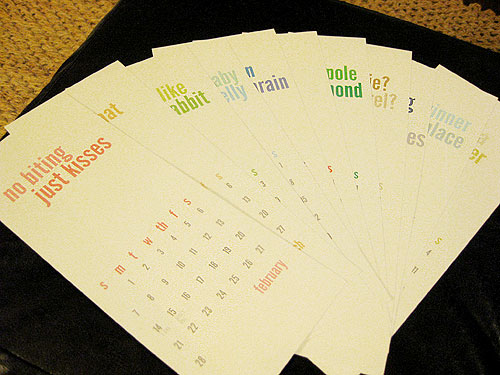
Everything from random song lyrics that crack us up to our short (but oh so memorable) wedding vows made the calendar- and of course that one was slapped on July since that’s our anniversary month.
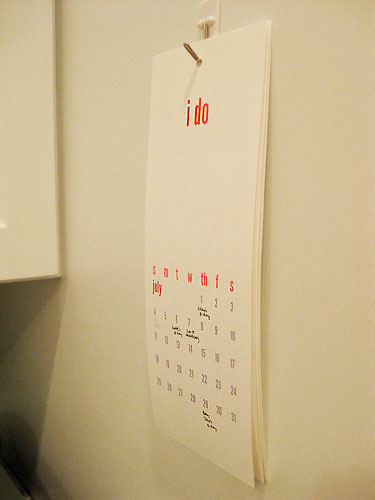
It was a simple project but it was surprisingly fun to put together. Like a walk down memory lane that we get to rewalk every time we glance at the kitchen calendar. And you can’t beat the zero dollar price tag. So what about you guys? Do you order calendars with custom family photos from places like Kodak and Flickr? Do you buy them for 50% off after Christmas at bookstores or boutiques? Or do you use your iPhone or your computer so much that a paper calendar is virtually useless? Spill the what-date-is-it beans.
Update: Thanks to a slew of very kind (and unexpected) requests, we’ve created a free zipped template of our calendar that you can download and customize with your very own quotes for each month. Please note that you must have Photoshop to open the PSD and edit the type layers (or use a free open source like GIMP). You also may need to download the font that we used right here (it’s also free). Oh and each month is a different layer, so remember to hide and show each one to print every month’s page. We hope it helps! Who knew so many others still needed a 2010 calendar?!

Kristen says
Did ‘that’s what she said’ make the cut?
YoungHouseLove says
Oh no! How could we have forgotten that one?!!! Next year for sure.
xo,
s
Danielle says
it did on mine!
Lauren says
I was a little late with my calendar-as-a-gift this year, but while I was home for Christmas and New Years I took a ton of pictures. My parents live on a golf course in Florida now and there are the most amazing sunsets every night with the sun reflecting on the lakes…so I went out every night and took a bunch of pictures! I sent them a calendar about two weeks into January and one went to my sister, who used it to brighten her work cubicle in New York :)
amelia says
um…love it! i honestly think you two could sell these (possibly using more general quotes then your personal ones) – seriously! and is that really just 8 1/2 x 11 paper? it looks longer? oh, and in response to what we do for our calendars – its sorta our tradition that my mom gets us our new year’s calendar every christmas. It’s a fun tradition and we’re always eager to see what she picked out for us (this year was a calendar with funny dog pictures and quotes).
YoungHouseLove says
Aw Amelia, you’re too kind. Yup, it’s just standard sized 8.5 x 11″ cardstock, but it’s amazing how much longer it looks when you chop off the sides!
xo,
s
amyks says
WoW! i get to be the first to comment…For the last three years I have been making calendars using shutterfly. My husband and I have been taking at least a picture a day of each one of our three kids since they were born(crazy, I know), anyway, I go through month to month and pick out cute, interesting, silly, etc. pics and put them in the corresponding months. It has become like a scrapbook and we have fun talking about the memories. I also make extra copies for the grandparents, they love them(esp. my parents as we live far from them). It has become a great new year’s gift.I get them when it is buy 1, get the rest for 50% off.
Jen says
My husband and I make about 6 personalized photo calendars for our family as Christmas gifts (shutterfly). We have 2 kids and nieces and nephews, so it’s nice to have photos from the past year that Grandparents can keep year after year as sort of a “yearbook” of the grandchildren as they grow up. We love picking out our favourite photos from the year to do it.
amyks says
Oops! Guess it wasn’t the first:)
Christin says
You guys just come up with the neatest ideas! It’s so cute and personalized and uber-easy. My hubby and I use a joint google calendar so all of our appointments and various activities are all on a calendar that’s easy to update via computer or phone. (We currently can’t update it via phone yet… but soon we’ll both have iPhones and it’ll be oh so awesome!) Thanks for the idea for the calendar!
Liz M says
And then he ate your brain? Are y’all going to let us in on your “inside jokes” or are they too “inside” to share?
YoungHouseLove says
That’s a line from a Lady Gaga song that we can’t stop singing to each other. So a phone call from John goes something like this:
John- Hey Sher, just got your message to call you back. What’s up?
Sherry- AND THEN HE ATE MY BRAINNNNNNNN!
Good times. It’s still endlessly amusing. We’re weird, huh?
xo,
s
Amanda says
Every year my sister in law makes calendars for my parents. She puts a little thumbnail picture of each person on their birthday. I kind of rely on electronic devices, but I want to ask her for one of her calendars because I am terrible about remembering birthdays!
I really really like that idea. It’s pretty great how we now have so much power to DIY things like this!
Maya says
Beautiful! So simple and classy!
I wanted more space to write in my calendar (I do menu planning etc. right on it) so I actually took a free calendar we got from a dept. store and printed out my own grid which I… prepare for the classiness… stapled right on the pages from the apartment store calendar (which had the month written nice and big at the top, but all the space in each month was taken up with pictures of things to buy). I end up having almost two full 8 1/2 by 11 ” grids to write in, and it doesn’t look quite as bad as it sounds. :) Maybe I’ll be even more adventurous next year and design something from scratch on the computer! I like the card stock idea!
candace says
This is an adorable project and (hopeyoudon’tmind) totally something I’d love to copy!! How creative – thank you so much for this post!
LauraC says
Love it! So cute! We usually get a calender from family – sometimes personalized, sometimes not (but locally made with a local business flavor). I MUST have a calendar in the kitchen. Don’t know if it’s just a that’s-the-way-it-was-growing-up thing, or what, but even though I use Outlook and other electronic calendars, nothing replaces my good old-fashioned paper one!
Sonya says
I love little creative DIY things like this- so cute! And I laughed when I saw the first few quotes at the top- the “I do what I want” is a “inside joke” quote that my hubby and I say to each other too!
emily says
you guys are too cute! what a great idea!
cbr says
“I do what I want” is one of our inside jokes, too! Cute. And, of course, “Do it” a la Ben Stiller in Dodgeball…
Heather says
Such a cute idea! If there was a Sherry/Heather calendar you know “my winks are blinks” would be on there. xoxo
YoungHouseLove says
Hey Heather! Yeah, I still say that to John. Did you see that guy on American Idol who kept winking like a million times in a row really slowly? It made me think of you blinking and asking me if it was a wink. Haha. Also “hooooley moley” would be on there along with “spicy tornadoes” and all sorts of other fun stuff. Miss you girl!
xo,
s
Tammy says
We use the Chick-fil-A Cow calendar, which always has funny themes. For oh-ten, it’s “Great Works of Cow Literature,” and has months for “Flankenstein,” “Steerlock Holmes,” etc.
The best part, you can usually get a calendar for free (yay!) with a $20 gift card purchase that we’re going to use anyway, AND, the calendar itself has $30 of coupons on it. It’s a great deal!
YoungHouseLove says
Wow that is a deal! We love Chick-fil-A!
xo,
s
Meg says
Love those! So much cooler than the templates Microsoft offers. I hadn’t received my usual slew of calendars (ranging from Beatles- to Broadway-themed) that I have a hard time finding space for; instead, I got zero calendars from Santa and his cohorts! So, I’ll definitely be copying your idea!! What a sweet, creative husband you have. :-)
Eric says
And when will I be able to order one of the templates in your store! It’s a must have!
Meg says
Oh, BTW, thanks for the font site. I’m a fan of dafont.com (also all free, and some are mighty cool).
Ben says
I’m a huge fan of items that are sustainable/reusable–so I bought calendreco’s perpetual calendar. (just google: calendreco). It goes in the office above my table and it looks great. Very modern.
Other then that, It’s Google Calendar all the way!
Eric says
I forgot to add that I have a Chinese restaurant calendar on the back of my pantry door – I’m such a good customer that they give me a free one every year.
Audrey says
love love love how simple and graphic this is! i made a calendar for my mom for Christmas in the same fashion, but added pictures of the fam. I could definetly do something like this for my house, though. and thanks for sharing the free font site as well!
Erin says
So cute! Would you all be willing to share your photoshop template with us!?
YoungHouseLove says
Hey Eric and Erin,
We actually thought about creating a downloadable version of our calendar but we didn’t know if anyone would even be interested (especially since it’s already February so we thought most people would already be covered in the calendar arena)! I’ll get John on the case tonight and if we can figure out how to offer one without crashing the site we’ll hopefully add that at the bottom of the post within the next day or two. Stay tuned!
xo,
s
Jenny @ Words On Wendhurst says
He he. Your DIY calendar is really cute, and so sweet that it is personalized. My sis-in-law gave us a calendar this year, with beautiful photography. We tend to alternate years, one year storebought, the next a photo calendar with pics of us!
Karen says
I’m on my second year of using an totally cool and awe-inspiring Extreme Ironing calendar:
http://www.calendars.com/Extreme-Sports/Sports/Extreme-Ironing-2010-Wall-Calendar/prod121656/?cm_mmc=Third_Party-_-Google_Base-_-ChannelAdvisor-_-General&CAWELAID=385154705
Basically, it’s pictures of people ironing all X-Games style. It makes me feel like a badass and reminds me to do my chores at the same time.
Chrissy says
As always, you guys are adorable.
What is what looks like an old style mini filing cabinet used for in the kitchen. Recipes?
YoungHouseLove says
Hey Chrissy,
Here’s the story of that great thrift store find: https://www.younghouselove.com/2009/02/hot-box/
xo,
s
LauraC says
Hey Sherry, Do you mind sharing what Photoshop version you have? We have a real old one (7.0) and I did a quick search and didn’t find any calendar templates. Just curious. Thanks!
Lara says
I love all of your Photoshop projects! Which made me want to ask you- which edition do you use? Mine is super outdated and I’m not quite sure if my edition would do all of this cool stuff you guys whip up. I’m such a computer DIY-er but I always end up doing my stuff in regular Word since I typically use my old photoshop for just photos.
Great idea on the calendar!
YoungHouseLove says
Lara and LauraC,
We have Adobe Photoshop CS Version 8.0. It’s definitely nothing hot off the presses but it’s great for sizing and retouching pictures, whipping up mood boards, and even making art like our wood signs and our recent calendar. Hope it helps!
xo,
s
Andrea says
A family calendar in our house is useless. No on looks at it but me so I have a Moleskin that I carry with me that has the week on one side and then a lined page on the other. It’s great! I can keep track of the day-to-day and then have a blank page for lists and reminder notes.
Irene R says
That’s a very cute idea.
patti says
i totally love this! and i love that you used a line from SNL, and one of my favorite sketches “two a-holes” (can i say that here?) “you look like a rabbit.” – love it love it! did i mention i love it? :)
happy wednesday!
Judy says
I really like different types of calendars. For personal planning this year I decided to try out moleskines color a month planner and I love it. For around the house date reminder I pick a pretty calendar that I later recycle into stationary. The hubs usually gets a CFA calendar and this year he also got one from Krispy Kreme. Both come complete with coupons for chicken and doughnuts which make his day or year rather.
Christine says
My mom has gotten into the habit of getting each of us a calendar for Christmas (as someone else mentioned above). She tries to get something that really suits each of us. I’ve gotten numerous calendars with botanical prints or Japanese watercolors each month (both of which I love). Once the calendar is used, I take my favorite images and put them in a mat and frame to hang on the wall. Lovely and free! Particularly nice if you’ve looked at the prices for “real” antique botanical prints – and you can’t even tell once it’s in a nice frame.
Jessi says
clever. I love handmade letterpress calendars, so I usually peruse etsy at some point in December. This is the beauty I chose this year:
http://www.etsy.com/view_listing.php?ref=vt_related_1&listing_id=35001630
Pink Heli says
Love this idea!! Looks like it turned out great!
mariel says
this is totally adorable! look at you guys! you’re not only interior designers, but you’re totally becoming graphic designers! anyhow one question. i loved your artwork that you DIYed in your bathroom…and i know you printed that too! so i wondered these projects are on larger paper. what size are you able to print at on your printer! and furthermore is it inkjet or laser? the quality of the printing is great!
YoungHouseLove says
Hey Mariel and Katie,
At home we have a regular old HP Officejet All-In-One printer/scanner (it’s an inkjet that we purchased over three years ago) that prints no larger than 8.5 x 11″. It totally gets the job done. We also have a family friend who has a printer that can print up to 11 x 17″, so we were able to print our 11″ x 13″ vintage signs for free (also on an inkjet printer). But anyone who needs to make larger prints than their printer allows can simply piece them together as you suggested or head over to Kinkos/Office Maxx for super cheap prints (laser or inkjet) while they wait. Hope it helps!
xo,
s
Katie says
What kind of printer do you guys use? Im looking for a new one (wireless).
Lesley H says
So fun, so personal, so YOU! I love this idea and hope you can make a download. I don’t think I’ll get much work done today since all I can think about are the quotes I’ll use for mine. Thanks for sharing!
Jacquelin Hicks says
Such a cute calendar! I’m addicted to my Outlook calendar at work. Unfortunately I cannot check it from home, so its a must that I check it right before I leave.
K. says
i LOVE the green file box on the counter! a project –or a find?
YoungHouseLove says
Hey K,
Here’s the story of that great thrift store find: https://www.younghouselove.com/2009/02/hot-box/
xo,
s
Jessica @ How Sweet says
I LOVE it! So cute and personal. I’d love to do the same someday. :)
Jarrod says
Love it! I wondered if the June quote was from that Lady Gaga song. All of her songs get stuck in my brain! I like to hope that she’s talking about actual brains, and not anything more questionable.
YoungHouseLove says
Yup, totally Lady Gaga.
xo,
s
Alicia Damron Photography says
Okay, now that is a really cute idea. How do you guys come up with all this simple, yet clever, ideas? Do you lay awake at night brainstorming? I really, really, like it.
Stickyheels says
That is seriously one of the most adorable ideas ya’ll have come up with. I’m brainstorming “inside jokes” at work now so I can recreate one for my husband and I. Thanks!!
dana says
love the “no biting, just kisses”…i’m assuming that’s for your dog (we say the same thing to ours), but i don’t want to pry if it’s not. =)
grace says
super cute idea! where did you get that little green file thingy? i loves it and must have one.
toodles!
grace
http://www.nameisgrace.blogspot.com
YoungHouseLove says
Hey Grace,
Here’s the story of that great thrift store find: https://www.younghouselove.com/2009/02/hot-box/
xo,
s
erin p. says
i love the Real Simple calendar i got from target. its got color coated stickers to write on and stick on the dates so it keeps me organized- i need something i can always see for bills/appoinments/birthdays etc- i can’t do the digital calendars! i also love lots of the cute art/photography calendars i’ve seen on etsy!
Nichole says
OMG! Do you guys act like the fat kid on Southpark when he’s on Jerry Springer? And say “I do what I want” to each other? We do it all the time at our house:)
Chrissy says
Oh fun! Love it!
Sorry, I did a little search but couldn’t find anything. THANKS!