Since a bunch of you have requested it, I’m going to attempt to dole out some technical blogging / coding advice. I’ll admit I’ve been very hesitant to write this because I am very much an amateur myself. Asking me for web design advice feels a bit like asking your waiter to teach you how to cook. I can tell you the basic ingredients of what we’re serving, but things might get hairy if I’m asked to put together a menu. It’s really all just trial and error and a decent amount of googling around for answers. Note: yes, the following visual is a coding joke, hence the brackets.

Now that I’ve let my insecurities do a lot of the talking, I will say that I’ve mustered up enough technical prowess to design and operate this blog (of course Sherry has input when it comes to the look/function of things) with virtually no outside assistance (the only exception being our host’s customer service line and the occasional help from a friend or two when we can’t figure out why the heck we’re crashing). So I must be doing something right not totally wrong. But if you’re reading this as someone more amateur than me, please take my advice with a grain of salt. And if you’re more of an expert, please try not to laugh. And feel free to offer up other helpful suggestions for anyone looking for technical/coding tips.
With that said, let’s dive in.
MY BACKGROUND: This blog wasn’t my first dance with coding. Computer Science was a required course at my high school, so at age 15 I was taught C++ and a smidge of HTML (try W3Schools.com if your high school wasn’t as geeky as mine). I don’t remember a lick of C++, but it did give me the basic understanding of how code works (and, more importantly, how it doesn’t work when something as little as one end bracket is missing). I used my minimal HTML skills to throw together some casual websites in high school (like this hilariously-embarrassing and hilariously-still-available Geocities site for my high school band French Horn section) but was never formally taught more complex languages like CSS, Javascript and who knows what else. So if it’s not already obvious that I’ve got some geek in my DNA, this photo should make it abundantly clear. Why yes my Dilbert sweatshirt does say “Technology: No Place For Wimps.”

THE CODE-FREE WAY: The beauty of blogging platforms like WordPress, Blogger, and Tumblr is that you don’t have to know any code to use ’em. Most of them make it easy enough that if you can write an email and upload a photo, you can blog. And that’s exactly how we started. We spent our first five months on a free WordPress.com account (screenshot below) where the extent of our “blog design” was sizing a header photo. So if you absolutely fear coding and designing, this may be the way to go for you.
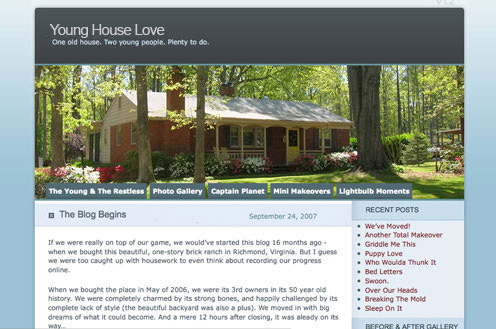
BE FIND A GOOD HOST: We moved to a self-hosted WordPress.org blog in February of 2008 in order to have more design flexibility. That meant having a find our own host, meaning that our site no longer lived for free on WordPress’ servers but instead on a server that we found and paid for ourselves. We went to the WordPress-recommended BlueHost (that’s an affiliate link) who charged less than $30 a year at the time. Our site lived on a shared server with about 99 other small blogs (meaning that other sites lived there with us, which is why it was so affordable) for about a year. Until we grew too big (i.e. regularly crashed the entire server… taking all 99 other sites down with us… oops). So BlueHost gave us the boot and we did a fair amount of research and landed at LiquidWeb (that’s an affiliate link), where we have our own dedicated server and some great customer support. It’s a far cry from that $30 a year price that we started with (try adding two zeros), but it’s all part of the deal when you’re as fortunate as we are to grow like we have.
OH YEAH, HOSTING IMAGES TOO: When we switched to LiquidWeb, we took some advice from others and also decided to host our images elsewhere – which reduces the load on one single server and can defray some of the cost. We briefly tried Flickr and Photobucket (since they were free or nearly-free, and we’re cheap) but after several complaints about those sites being blocked at certain workplaces (not that any of you read blogs at work, right?) we decided to transfer to a paid host: Amazon S3 (which we saw some other larger sites using successfully). Over time our number of photos grew along with our traffic… and so did our cost for image hosting (this sounds crazy to type, but we pay tens of thousands of dollars a year just to host our images). But again, hosting expenses are just part of the whole full-time-blogging thing, and we’re always grateful to “see” you guys… so we wanted as many people as possible to be able to access our pictures. You know, since they’re kind of the best part.
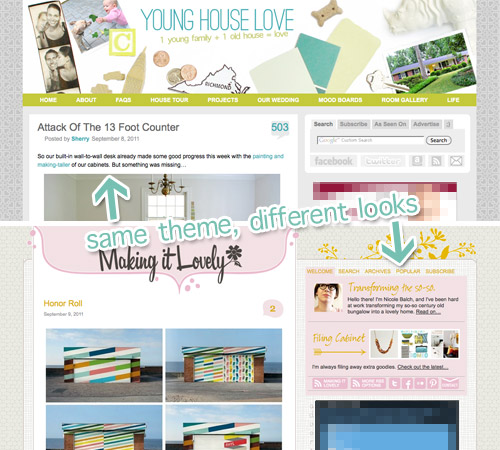
ESTABLISH A THEME: A theme is what dictates the look of your blog (colors, layout, fonts, etc). WordPress has lots of built-in themes, or you can go find your own (they’re not always free, though). And if you’re really ambitious, you can make your own. But I’m not that ambitious, so we just found a theme that we liked and tried our hand at customizing it. Ours is a free theme that’s called “WP Premium” and we learned of it through Nicole at Making It Lovely. Our two sites are examples of how one theme can be customized to create two totally different and unique looks (we both still use the same template with different customizations). So find a theme that has the basic functions that you’d like in your blog – something with a certain number of columns, a specific kind of navigation, a traditional look that you like, or even a magazine-style theme (like Layla & Kevin’s blog) and start there (that way there’s no coding from scratch involved).
STYLING: If your theme is like ours, it relies on Cascading Style Sheets (aka CSS). It’s a file (or files) that dictate how your site looks when it loads. So rather than me having to manually code our blog titles to be a certain size and color each time, the theme knows to reference my style sheet each time and follow those guidelines. Our theme has two style sheets, one that guides the size and placement of elements on the page (i.e. make the sidebar this many pixels wide and this far to the right of the main content box) and one that dictates images and color (i.e. all embedded links are blue). I didn’t know CSS before blogging so my technique to customizing the style of our blog was basically “change some code, see what happens.” A lot of times it would have wonky results (“woah, the menu bar suddenly disappeared”), but gradually I figured out the cause and effect of my coding tweaks. And slowly but surely I worked towards a custom look. There are some great CSS lessons at W3Schools.com if you want to learn some coding specifics.
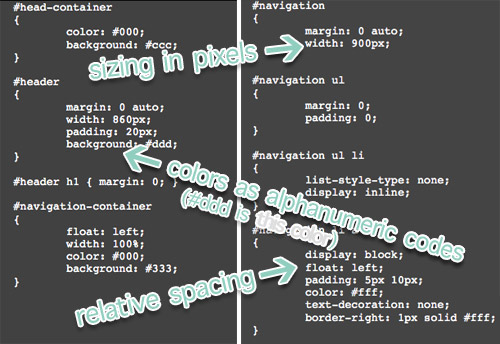
AN IMAGE IS WORTH A THOUSAND CODES: Obviously not everything on a website is number and code. Actual graphics (like a headers or sidebar icons) are a big part of the design too. Giving advice on Photoshop is a whole ‘nother topic, so I leave it at this: get yourself some good photo editing software, specifically one that makes it easy to adjust colors and sizes (in pixels, specifically) and save in a variety of formats (like web-reduced JPG and transparency capable GIFs or PNGs). Obviously we’re fans of Photoshop (we own Adobe Creative Suite), but we hear that sites like Picnik are good alternatives. Beyond that, just be sure you’ve got a way to upload your images. Your host may have built-in FTP software or you can Google for a version to download.
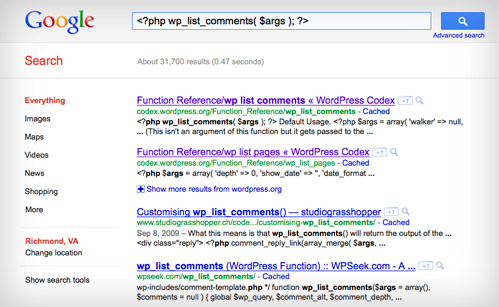
TRIAL, ERROR, AND GOOGLE: The “change some code, see what happens” is pretty much my best advice for coding as an amateur. Sometimes the easiest way to understand what a bit of code does is to alter it, and observe the consequence. Just be sure to save the original code somewhere so you’re able to undo it easily. When I get really stuck, I turn to Google. Just Googling the mystery code (and I mean literally copying the code into the search box) can turn up some enlightening results – message boards, support forums and even sometimes literal definitions of the code in question). WordPress itself has some great forums and even a Codex that breaks down what all of their code and functions mean, including some tips on altering them.
PLUG IT IN, PLUG IT IN: You can also amp up the function / customization of your site with Plug-Ins, which are free add-ons to a WordPress blog that you can usually download from right within the WordPress dashboard. They can add cool widgets to your sidebar, increase the functionality of your posts, and even help your site run faster (like our much relied upon W3 Super Cache plug-in which keeps us from crashing all day, every day). But plug-ins can also bog down your site too (like when yesterday’s polling plug-in overwhelmed our site to the point of ahh-we’re-craaashing four frustrating times in a row). So it’s always preferable to hard-code these types of functions where possible (if we knew that plug-in would fail ahead of time we would have tried to hard-code something else). If hard-coding is too hard (har-har), just learn to live with less of them (the ones that really matter) to avoid gray-hair-inducing emergencies like unexplained loading errors and full-on site crashes.
GET HELP: At some point you’ll get stuck. Everyone does, no matter how brilliant they are. So it’s always good to have some places to turn. These are my favorites:
- Google (as I already mentioned)
- Support Forums (specifically WordPress’ – though responses aren’t always quick)
- Technical Support (I rely on LiquidWeb for help with my server since we pay them a pretty penny and they’re known for their hands-on customer support)
- Twitter (there are lots of smart people out there if you’re willing to make a public cry for help)
- Other Bloggers (if you see something you like on someone else’s site, try asking how they did it – sometimes it’s as easy as sharing the code, but other times it’s not really something that can be easily passed along)
- Paid Support (sites like WP Help Center can give you some paid help, or – in my case – I’ve hired some local experts/friends when I’m really stuck on why our site is inexplicably crashing).
So, there you have it. Hopefully that was helpful for those of you who were interested. I’m sure there are lots of specific questions floating around that I didn’t cover (my answer would probably be “try changing some code and see what happens, or google it!” since that’s usually my go-to method). But again, if you’re an expert – feel free to weigh in with advice for anyone interested! Wait, but one question first: who had a super sweet Dilbert sweatshirt like mine? Come on, I know somebody did. And I hope you also took the opportunity to rock it with stonewashed jeans and a bowl haircut a la Ninth Grade John.
Update – Some of the most frequent requests that we get are for info about professionally blogging (how we made our site, how we grew our following, how we make money, etc) so we shared all of the details about how we started a blog, grew our traffic, and turned it into a full time job.

LauraC says
Hey! I’ve wanted to ask you for years -literally- if you had a picture of your original blog to show us! How awesome is it that you do and you did?! And I didn’t even ask; you, like, read my mind. ;-) Really like it, but then I’m partial to blue. Oh, and I’ve gotten used to your new blog design. Knew I would, just takes me a little while. And like everyone else, I love the heart background.
elizabeth hefley says
Could you share where you got the code/plug in etc for the search/subscribe/as seen on/advertise box and the Us/Archives/Categories/Blogs we love boxes? I love those. Thanks Elizabeth
YoungHouseLove says
Hi Elizabeth,
It was some javascript code that came with our theme, but I believe it’s called “Tabber” – so if you google that it should turn up some of the necessary code.
-John
Kaylyn says
So I know this has nothing to do with coding, but every time I see “Blogiversary IV,” I think you are referencing my place of work (InterVarsity) since IV is such a common abbreviation!
D'vine Living says
Hi John, thanks for this awesome post. I got someone to design my blog, but I have to ask the guy the whole time when I want to make changes. Is there a text book or some source that I can get to teach myself how to change things. Where do I start? I have absolutely no idea how these coding stuff works, but would love to learn so that I can do it myself- you know DIY!! :)
YoungHouseLove says
I don’t know of any text book off the top of my head (though those “For Dummies” books probably are helpful). But I’d recommend W3Schools.com as an online resource instead of a text book because it actually lets you practice some of the techniques!
-John
Han says
You guys probably already know about this but I thought I’d put it out there for someone just starting in web development.
Firebug, http://getfirebug.com/ and Web developer toolbar https://addons.mozilla.org/en-US/firefox/addon/web-developer/ are the greatest thing a webdeveloper can own! It saves hours of save, refresh!
Also, as a free alternative to Photoshop (and piknik) theres GIMP, http://www.gimp.org/. Unfortunate name but very very good! Also the next big release is rumoured to be all in one window (aka more photoshop like)
Jennifer says
John,
You.are.awesome.
Diane says
Hi John – I really appreciated the techy details of your site. I’m a techie geek myself (but on one of those BIG dinosaur mainframe computers codeing COBOL) and I’m in the middle of taking web classes (currently doing CSS and javascript). I’m having trouble with CSS, I think I am better with tag based things like HTML and Coldfusion! I have to say your explanation of what CSS does made me understand it better – so kudos to you! You outranked my teacher – ha ha ha!
Thanks guys have a good weekend!
Tia says
Great post John. I have somehow become the IT expert at my office in just this manner… trial and error, and lots and lots of Googling. Would love to amp up my Photoshop skills (though I am a goddess in InDesign) and knowledge of more advanced CSS and even Java. Thanks for sharing!
Heather Johnson says
Hahah! That horn page made me realize you went to high school with my husband. I pulled out his old yearbook and found you!
YoungHouseLove says
Isn’t he cute? Haha. Maybe I’m biased.
xo,
s
Brittney says
Oh geez… you had to redo what was the old header to say YHL instead of TYH? :(
I was a TYH reader (found you because of painted kitchen cabinets) and I thought that whole era was just another chapter of your blogging lives so it’s sad to see you’ve had to act like the old site didn’t exist.
YoungHouseLove says
Yup, it says the old name in one place on our site- this post about why the name had to change. Otherwise we agreed to “erase” any sign of it. Just didn’t want them coming after us again, ya know? But man, changing all of the archived posts and pictures was a pain! Haha.
xo,
s
Brittney says
Oh wow! All of that I did not know so thanks for the link. I had lost you guys for a month or so way back then since we were selling my then boyfriend’s (now my husband) townhouse and buying/packing/moving into our current home. That old townhouse is where I painted the cabinets and they turned out great and helped sell the place by the way.
Wrapping up the blogiversary with some LOVE—
Thanks so much for all of the HOUSELOVE!! (and BABYLOVE… from bumgenius to bf’ing your advice/experiences have helped me stay sane these last 6 months!) Here’s to continuing your success for years to come <3
Bboss says
So my eyes started to glaze over half way through. Sorry. I hate coding too. I’m an AutoCAD/Sketchup nerd. How’s the Sketchup lessons coming? Are you going to post a snapshot sometime?
YoungHouseLove says
Still getting our bearings on the whole Sketchup thing! Maybe in a week or two we’ll share a big brain dump!
xo,
s
alg says
Hey, John —
Thought you’d get a kick outta this:
http://www.thinkgeek.com/homeoffice/gear/6806/
Not sure it’ll hot-link, but it’s worth the cut & paste into your browser…
PS — Good post. Writing about tech stuff is boring, huh? The 9th grade pic is a nice touch :)
YoungHouseLove says
LOL, that’s very geeky indeed.
-John
Mary says
TJ!! “We came for the sports.”
Jessica says
Hi there, This a super great post and helpful!! I am actually starting my own little blog to share with friends and family about a house my husband and I are about to buy. However, is there a code to hold format so the blog formatting doesn’t get jumbled depending on the computer? Just curious!! I LOVE YOUR SITE! And very inspired by you both!
YoungHouseLove says
CSS is supposed to help keep your site consistent, but it’s not perfect. Different browsers read code slight differently so I find it impossible to get everything perfect on each browser (I hear this is bane of most developer’s existence). Plus people can have different settings on their computers (like larger text, blocking javascript, etc) so admittedly a near impossible task to keep it absolutely consistent – at least in my experience.
-John
Kristin says
I’ve been reading for awhile and never commented before, but the TJ band shoutout compelled me to do so today! I also played trombone at TJ in the marching band and in SWE and loved it. We had a section page at one point, too, but it is sadly now defunct. Thanks for the great posts and all the work you guys do!
carissa says
I really love your guys’ custom menus on the side bar and have been wanting to do something like that for SO long on my not-yet-being-used blog (since I want to get the coding and layout right first, lol!!) Any tips you can give on creating a custom menu with your picture and description on the one tab and then other tabs for things like archives, categories, etc.??? I’d REALLY appreciate it.
YoungHouseLove says
Those tabs came as part of our theme and I believe it’s a javascript function called Tabber. If you Google that (or maybe “Tabber.js”) you should find some instruction. We basically took what was there and then edited it to contain the info we wanted.
-John
Ellen says
Do you have a list of the plugins that you currently use and/or love?
YoungHouseLove says
Just scroll back in the comments for that list from John. Hope it helps!
xo,
s
Erin says
Thank you for doing what it is you need to do so that I can read the blog at work. And this is an office that blocks wikipedia! So far they have not caught on to you guys or pinterest, so please don’t tell on me.
YoungHouseLove says
Haha, it’s our little secret.
xo,
s
Ingrid says
Oh my gosh, I’m so excited Reader Redesigns are coming back!!! I’ve been faithfully keeping up with your blog for awhile now (and enjoy it so much so that I went back and read everything from the beginning!) and that’s the one thing I missed this year :) Keep up the great work!!
Rose says
Hi John,
I am a long time reader and rarely comment, but I just want to say your high school horn webpage made my day! What a relic, I can’t believe it is still out there in cyberspace. My husband also has a super dorky geocities page from his high school days that I like to tease him about. :o)
From one band nerd to another (I teach 5th and 6th grade band), Rose
bobbi says
omygosh! love the 120 pt type in the player profiles! penquins! he he….makes me appreciate your site even more, knowing you came from those humble beginnings!
Caroline says
Great work on all these posts! Just a quick quesion, what is the font you use for the title “Young House Love” and the posts from this week? It looks really good!
YoungHouseLove says
The font for Young House Love in the header is Ostrich Sand. As for the posts for this week, those are set to a generic sans-serif font (like Arial). Hope it helps!
xo,
s
Drea says
Ahhh geocities!!! I use to have one of those :) and dream page something and another TRI something, but I forget the names. Ahhh those were the days :)
I use to use blogger and found editing an HTML based theme was much easier than CSS.. CSS confuses the heck out of me… and I consider myself pretty tech savvy.
Ive had wordpress tho for a few years now because my business site was self hosted, so it just made sense…
and well, I like it, but got fed up with tweaking my own templates thru css.. so I recently purchased HEADWAY – it really is worth the money. SO EASY to switch around.
No more CSS stuff that takes me hours to perfect.
Just a thought for future blog looks :) I think yours looks great tho!
http://www.dreawood.com – got headway on there, but it can be changed any way you can think of :)
Bob says
Great article. If interested, here’s two quick tools that I find handy when dealing with colors and troubleshooting CSS. For colors, there’s Firefox add-on “Colorzilla” that gives you a color sampling tool right in your browser. For troubleshooting CSS, my first go-to tool is a bookmarklet called “XRAY”. It shows you style information on elements on the page, and you can step out through the nested code to see what’s what…where…and hopefully why. :)
YoungHouseLove says
Wow- thanks so much!
xo,
s
Bob says
Just realized I should have included a link to XRAY (you get all sorts of nothing-to-do-with-CSS results when you google “xray”) :)
http://www.westciv.com/xray/
YoungHouseLove says
Thanks so much!
xo,
s
Meredith says
I just started a blog last week, so I can’t tell you how perfect this weeks posts have been! One beginner questions for you – I have the same theme as you do (WP Premium), but for the life of me can’t figure out how to add a background. I’ve googled, tried looking through code, etc., but can’t find anything. Any help would be great (same goes for changing the header…). Thanks!!
YoungHouseLove says
You can change the background by changing a line in the “style-red.css” (or whatever color you’re using). It’s just a couple of lines down and says “body {background: url(XXXXXX.gif) repeat;} (where XXXXXX is the filename). Just upload a new file and reference it here. You can do the header in a similar way, but the line is in header.php. Look for where it says “body – div id=”header” (it’ll have bracket symbols too, but I can use those here or they won’t show) and you’ll see an Img src=”XXXXX” line. That’s the file for the header graphic. Though if you make your header any different size than the original file you’ll also have to change a few lines in the style.css file to make everything line up again. Hope that helps!
-John
Emily says
Maybe this is a silly question, but what’s the reason for hosting images via a 3rd party website and using those in your blog post vs. just having the images on your hard drive and uploading them to the post…does it make it run faster? I use Flickr to back up most of my pictures but when I insert pictures into a post, I don’t pull them from flickr, i just upload them from my computer {i use windows live writer and it’s awesomeee}.
YoungHouseLove says
Our hard-drive isn’t accessible to other people (it’s a private place that’s not online) so any photos on our hard-drive wouldn’t be visible to anyone but us. It sounds like you store all of yours on your server (if you upload them there from your computer) which means every time someone comes to your site to see your images, your server has to load them for those people. As your traffic grows, it becomes more of a drain on your server to store them all there – and it can slow down or even crash your site if a lot of people click over to access your photos all at once. It’s usually a lot more expensive to buy a bigger server to host more photos as your traffic increases than going to a third party site like amazon S3, who will do it in bulk for you. So instead of uploading them to our server, we just put them there (on a cloud server) which serves them up for everyone. Hope that makes sense!
xo,
s
Lisa says
Great post! This has inspired me to start my own blog to keep friends and family updated on progress with my own house. I’d never even considered doing it before, but it’s lots of fun…although it has only been 2 days!
Tyler Jones says
Have you guys considered trying cloud flare to help with the server load?
https://www.cloudflare.com/
We’ve used it on a few sites with great success.
YoungHouseLove says
Thanks for the tip Tyler! We’ll have to check it out.
xo,
s
ellis says
Can I tell you that the FIRST thing that popped into my head when I woke up this morning was, “Hey! YHL changed that old screenshot!” Haha- apparently my subconscious had been working through that for the past few days.
I still remember how terrified I felt when I read your “The End of…” headline and thought you guys were going away. Been a fan for a loooonggg time and y’all really have accomplished bigger and better things since then. Happy #4!
Christina says
I was playing with my WordPress.com blog’s appearance over the weekend. I couldn’t find a single theme offered by WordPress that looked exactly how I wanted it to, but I guess I shouldn’t be surprised by that. It’s very interesting to hear the process you guys went through to get your blog to the awesome set-up it has today. I would LOVE to upgrade to a paid host or at least WordPress’s “Custom Design” feature so I could have more control over everything, but that’s not in the budget at the moment. I think I’ll wait and if I ever get to oh, at least 5,000 hits a month maybe it’ll feel worth it. Haha.
Melissa says
You guys are so great! Happy Bloggaversary! Have you ever considered using a wordpress theme blog that has kick butt customer support built in? (My husband does support for prophoto and loves it!) ;)
YoungHouseLove says
We’ve considered it, but right now we’re not ready to bite the bullet and switch themes.
-John
Reese says
Great post. My journey through building various websites over the years is quite similar. A lot of googling and trial-and-error. Though, I have to say, your blog is much more attractive than mine is.
I never had a nerdy Dilbert shirt, but I do have an old website (or 3) that is surprisingly still out there. LIke the one I made for my community college’s web radio station http://wkgcww.tripod.com/ complete with gif animation and a photo of me before I started waxing my eyebrows, yikes!
amy c says
Thanks for the tips John. Great info.
On the subject of widgets/plugins, are the ones in your sidebar custom made or found, free or purchased? If they are found/purchased, you had to have tweaked the style to match the rest of the blog right?
Thanks again!
-amy c
YoungHouseLove says
I think all of those are text widgets (not plug ins) that we’ve just coded with HTML to help them work with the look of our site. The twitter one uses Twitter’s widget code though, but it’s not a plug in. Best of all, everything was free. Hope it helps!
-John
Melanie @ Mailbox Journey says
Do you guys use a plug-in for your comments?
YoungHouseLove says
Nope, we just use wordpress (we have them on “moderate” so we can answer questions as they come in and delete spam).
xo,
s
amy c says
Another question and really I’m looking for a term. What is the term for the address stuff you did? For instance, younghouselife is at life.younghouselove.com now. What kind of work is that called? Trying to figure out how to do that but don’t know what to Google. :) Thanks!
YoungHouseLove says
That’s called a “subdomain” – hope it helps!
xo,
s
Kris says
Hi YoungHouseLove,
I am a big fan of your website and love the way you interact with your readers.
I had a quick question. I am currently using WP Premium and cannot seem to change the background. Do you remember how you were able to get it to change?
Thanks!
YoungHouseLove says
It’s in the style sheet, which I believe is entitled style.red.css or style-red.css (if you’re using the red theme). Hope that helps!
xo,
s
Anna Tulou Orr says
Good morning!
A good friend (we’re fellow Richmonders) recently recommended your blog to me and I have been loving it! I’ve also been inspired by your blog design. I’ve been on hiatus from writing my two blogs http://www.purpleatheart.com/blog and earthkindherbal.wordpress.com while I tackled a couple little things like getting married and having a baby *grin* but I’m now interested in getting back into the swing of things, a complete redesign and possibly combining the two blogs (sort of like how you have your main Young House Love blog posts and then your Young House Life posts.
I’m interested in the WP Premium theme, and possible the WP Remix – can you offer me any insights about how it was transitioning your site to the new design? I know HTML and CSS pretty well already – it’s what I do for a living – but how was it transferring your existing blog posts to the new design?
I’d certainly appreciate any advice or insight you may have – you can e-mail me directly if you don’t want to use up comment space :)
Thanks bunches,
Anna
YoungHouseLove says
It wasn’t that hard! It’s the only theme we’ve worked with so we can’t compare it but if you know HTML and CSS you’re in good shape! Good luck!
xo,
s
Dani says
Hey guys,
Was wondering if y’all are using the W3 Total Cache or the WP Super Cache plugin?
I was running the W3 Total Cache and was on with support today and they said that Super Cache is preferable.
Just curious since yours says W3 Super Cache in the post…realize this is a bit old though so maybe they renamed it?
YoungHouseLove says
We’re using WP Total Cache since the way we coded things that is more helpful to our template than the Super Cache (it was making things all wonky). Hope it helps!
xo,
s
Christiana says
Great helpful post! I’d love to know which plugins and widgets you most love as I’m getting the ball rolling on my own self-hosted WordPress blog. Thanks!
YoungHouseLove says
We love Akismet, All-in-one-SEO Pack, Google XML sitemaps, Highlight Author Comments, W3 Total Cache and WordPress Gravatars to name a few basics!
-John
Charlotte says
Hi John,
I finally feel like my little ol’ blog has some legs and a voice and am thinking it might be time to pull away from wordpress to a self-hosting situation mostly to allow for more design options, etc. But… I know zilcho about coding. Learning as I go, but more to trouble shoot and compare two chunks of code to see where the glitch is. Did you all find that the transition from WordPress host to self-host was a simple one or are there hidden areas that I’ll now have to deal with?
Thanks!
Charlotte
(Sorry to be jumping into such an old comment thread…)
YoungHouseLove says
The two biggest challenges of going to a self-hosted blog (at least in our experience) was 1. Finding a host and 2. Customizing our template. The good news on the second one is that you only have to do as much customization as you want. Just like with your wordpress.com blog, you can stick with a template as closely or as loosely as you want / your skills allow. So for us, that was something that evolved as we got more comfortable with code. As for a host, we had a good experience with BlueHost while we were just starting off as a self-hosted blog. I know of several other bloggers who use/have used them as well. They do have a technical support number that’s pretty helpful too if you get into a bind with your code.
Good luck with the move. That’s exciting!
-John
Charlotte says
Thanks, John! Sounds do-able! I think I can… I think I can….
Vicki says
There is this Kickstarter project ending in a few days that is a game designed to teach young kids (like Clara’s age) programming. It’s called Robot Turtles http://www.kickstarter.com/projects/danshapiro/robot-turtles-the-board-game-for-little-programmer. My husband is a programmer and he’s super excited about it (he bought it for our 4 month old. We won’t be playing with him for quite a while…) I’m not connected with it at all, but just seemed like the thing you guys might enjoy playing with Clara and wanted to let you know. Hope that’s not too weird! :)
YoungHouseLove says
So cool! Thanks for sharing Vicki!
xo
s